Workout Wednesday

#WOW2023 Week 42 | Can you proportionally brush from multi-selection?

Introduction This week’s challenge is another inspired by my everyday work. As we launch new features, we look at how different segments of users engage with them. We wanted a smooth way to click into the segment combinations that were of interest, without having to go back to the top to change a bunch of […]

#WOW2023 Week 42 | Can you proportionally brush from multi-selection? Read More »

Tableau, Workout Wednesday
#WOW2023 | Week 41 | Can you build a flexible tabular display?

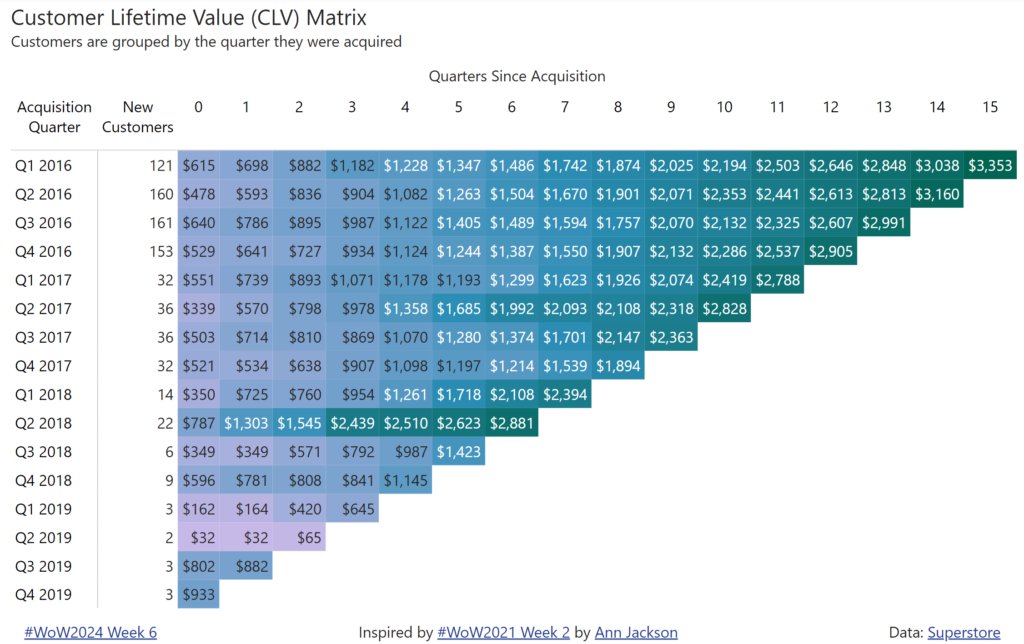
Introduction So my week has rolled around again, and yet again the inspiration for this week comes from this viz by Sam Parsons – Man! That guy is good!!  This week I’m asking you all to recreate a tabular display. It’s a common request from users to just ”show me all the numbers”, while we

#WOW2023 | Week 41 | Can you build a flexible tabular display? Read More »

Tableau, Workout Wednesday
2023 Week 40 | Interactive Rolodex for Large Data Viewing

Introduction Hello and welcome to the week 40 CRMA challenge! The instructions are written assuming you already have a dev org with Accounts and Contacts loaded.  If you need to spin up a new org with data, see the link below.  This week we are creating a interactive table to search/sort Customers and Accounts by

2023 Week 40 | Interactive Rolodex for Large Data Viewing Read More »

CRM Analytics, Workout Wednesday

2023 Week 40 | Power BI: Bar chart label bonanza

Introduction Last week’s workout caused some healthy discussion about bar chart labeling preferences and best practices. This week we will look at other ways to implement space saving labels while also showing the data labels for the each bar in a bar chart.  The report shown below demonstrates 4 ways to implement bar chart labels

2023 Week 40 | Power BI: Bar chart label bonanza Read More »

Power BI, Workout Wednesday

#WOW2023 | Week 39 | Target Achievement Report (Guest)

Introduction Only X months/ a year later, Val is back as a guest coach with another challenge.And if you remember #WOW2022 W35, you know that Val loves a good table! Anicely formatted table, if possible. A table filled with table calcs – even better.This week’s WOW challenges you to create a dynamic tidy-looking table showinga

#WOW2023 | Week 39 | Target Achievement Report (Guest) Read More »

community, Tableau, Workout Wednesday

2023 Week 39 | Power BI: Bar chart custom labels

Introduction This week we’re revisiting Meagan’s challenge where we built a bar chart with long labels. We’re going to use a trick recently unveiled by Bas (@howtopowerbi on Twitter) to create custom labels for bar charts. If you have long labels in your bar chart, they may be truncated depending on the size of the

2023 Week 39 | Power BI: Bar chart custom labels Read More »

Power BI, Workout Wednesday

2023 Week 38 | Enhanced Single-Click Interactions

Introduction Hello and welcome to week 38 of our CRM Analytics WoW challenges! This week we are exploring Single-Click Interactions through Dashboard Widgets! This feature allows you to create a curated journey for your users turning a static dashboard into a dynamic navigation experience that progressively reveals more details. The teams at Salesforce CRM Analytics

2023 Week 38 | Enhanced Single-Click Interactions Read More »

CRM Analytics, Workout Wednesday

2023 Week 38 | Power BI: Visualize the State of Quantum Computing with Deneb

Introduction The race to dominate quantum computing has the potential to revolutionise various fields by solving complex problems that are currently intractable for classical computers.  This week we will recreate the infographic “The State of Quantum Computing” published in the Harvard Business Review magazine (Harvard Business Review, vol. 101, issue 2, 2023, p. 25). Requirements

2023 Week 38 | Power BI: Visualize the State of Quantum Computing with Deneb Read More »

Power BI, Workout Wednesday