#WOW2026 week 8: DZV and Filter Actions

Introduction

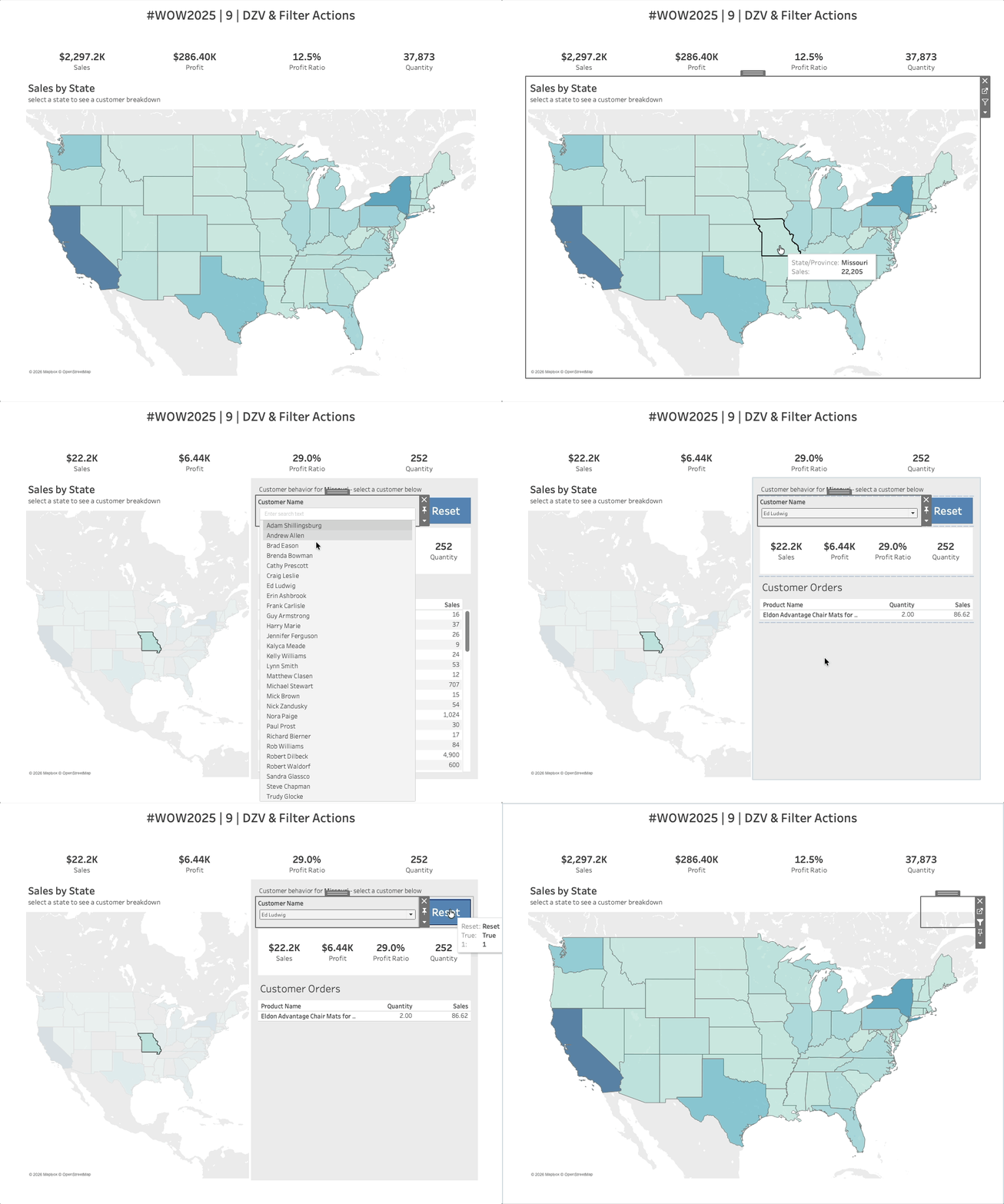
Welcome to week 9! I recently had a client reach out about some advanced navigation and filtering requests for their dashboard. It combined elements of Dynamic Zone Visibility and different types of filter actions. And I thought it was the perfect challenge for this week so here ya go!

Requirements

  • Dashboard size: 1000×800
  • Create a map showing sales by state
  • Create KPIs
  • Add an action that when a state is selected, a new zone of customer behavior appears for the selected state
    • Customer filter
    • KPIs
    • Product Details
  • Add a reset button
    • When clicked, the dashboard resets completely


Dataset

Available from here.

Attribute

When you publish your solution on Tableau Public make sure to take the time and include a link to the original inspiration.  Also include the hashtag #WOW2026 in your description to make it searchable!

Share

After you finish your workout, share on Twitter and/or LinkedIn using the hashtag #WOW2026 #Tableau and tag @WorkoutWednsday

Solution

Interactive