Data App

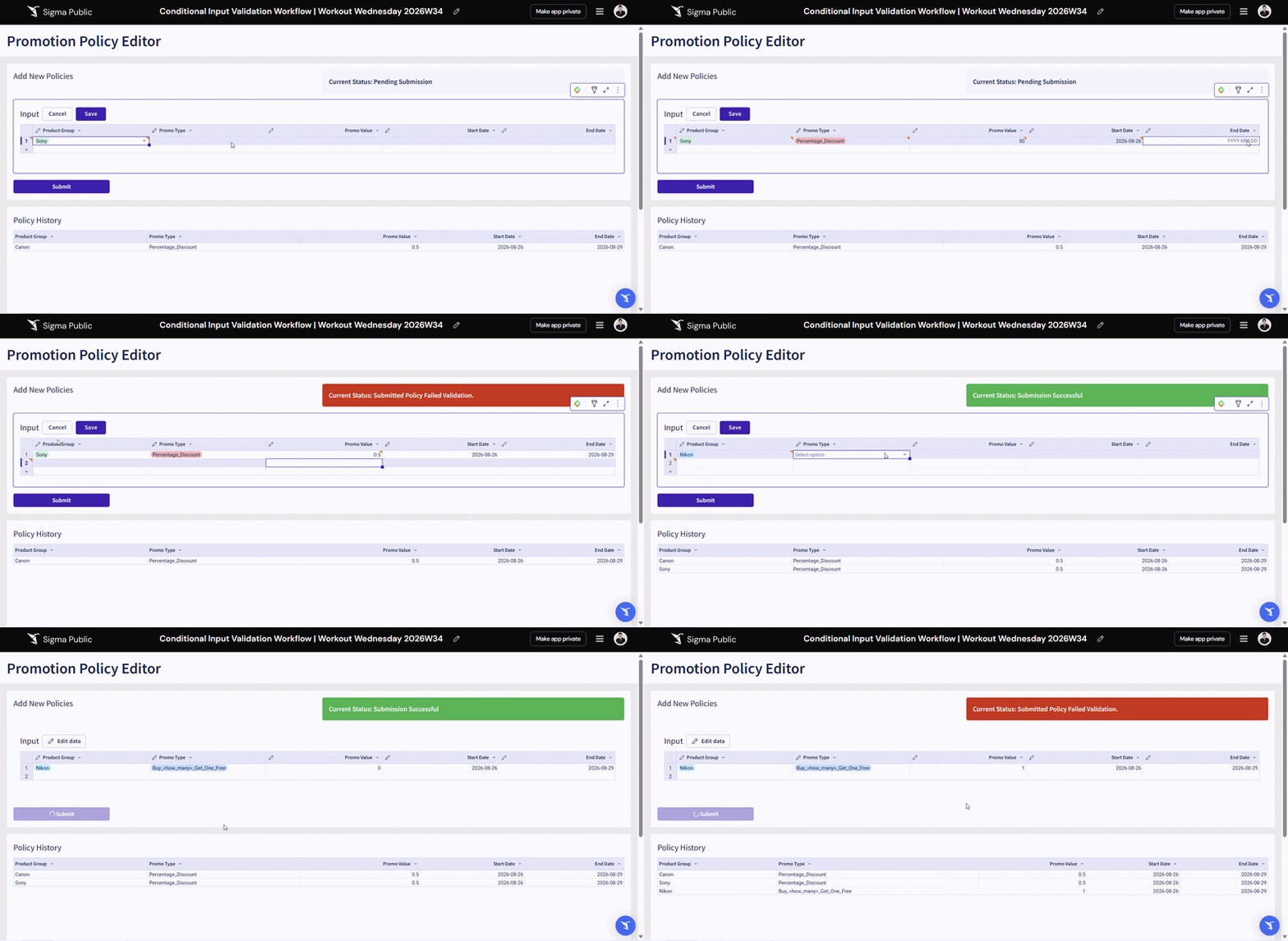
2026 Week 34 | Sigma: Input Table Staging with Conditional Validation

Introduction Welcome to Week 34 of 2026! Do you leverage Sigma Input Tables to produce critical data that supports downstream data marts, joins, or reporting that could be impacted by a breaking change? This example shows you how you may leverage multiple layers of Sigma Input Tables to create a staging area that checks values […]

2026 Week 34 | Sigma: Input Table Staging with Conditional Validation Read More »

Sigma, Workout Wednesday
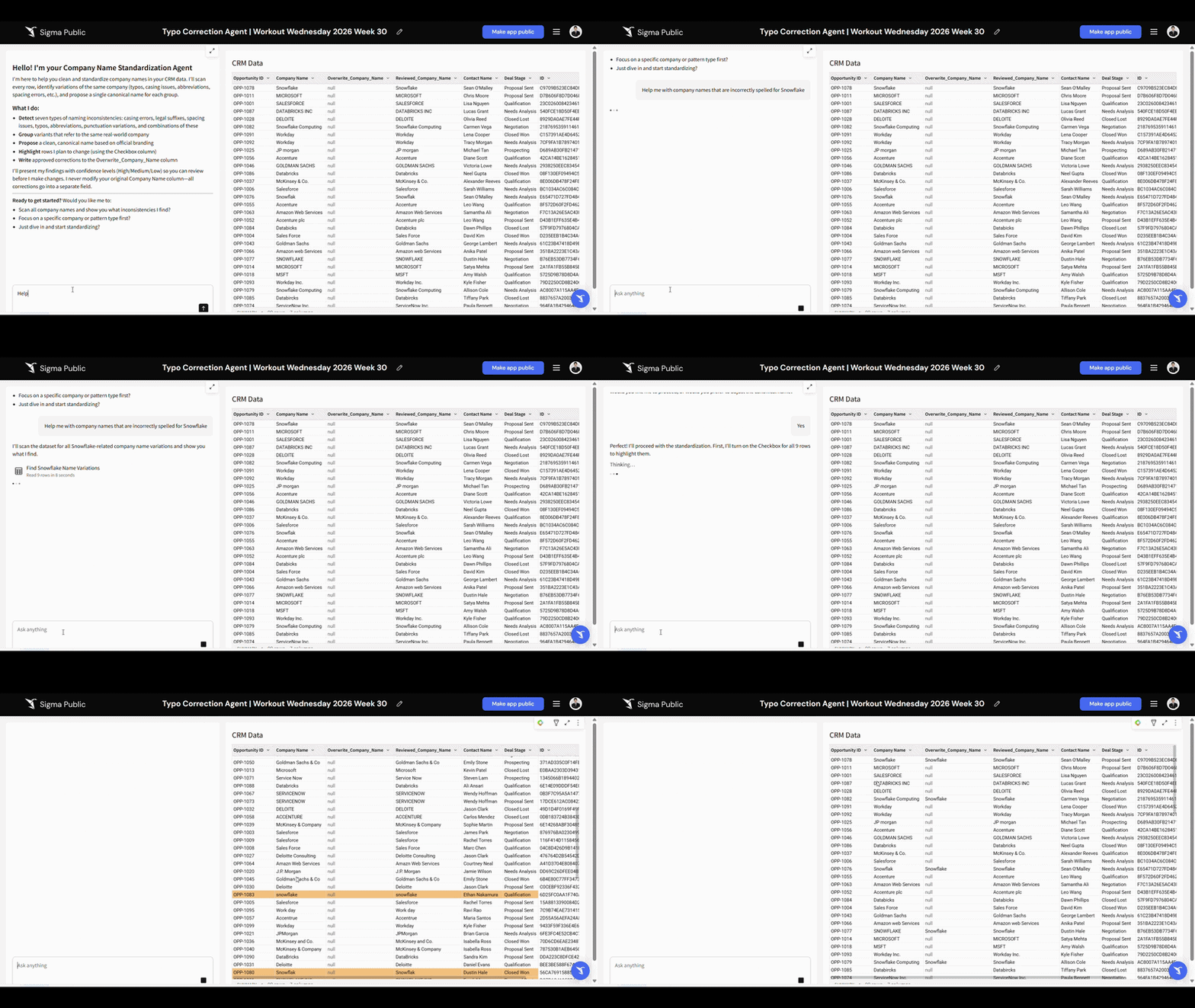
2026 Week 30 | Sigma: Workbook Data Prep AI Agent

Introduction Welcome to Week 26 of 2026! Sigma Agent allows you to read, write, and execute actions natively within the workbook, data sources, and input tables. This challenge showcases how you may build last-mile data prep into a workbook with Sigma Agent.  The example setup requires a Linked Input Table to store output from Sigma

2026 Week 30 | Sigma: Workbook Data Prep AI Agent Read More »

Sigma, Workout Wednesday
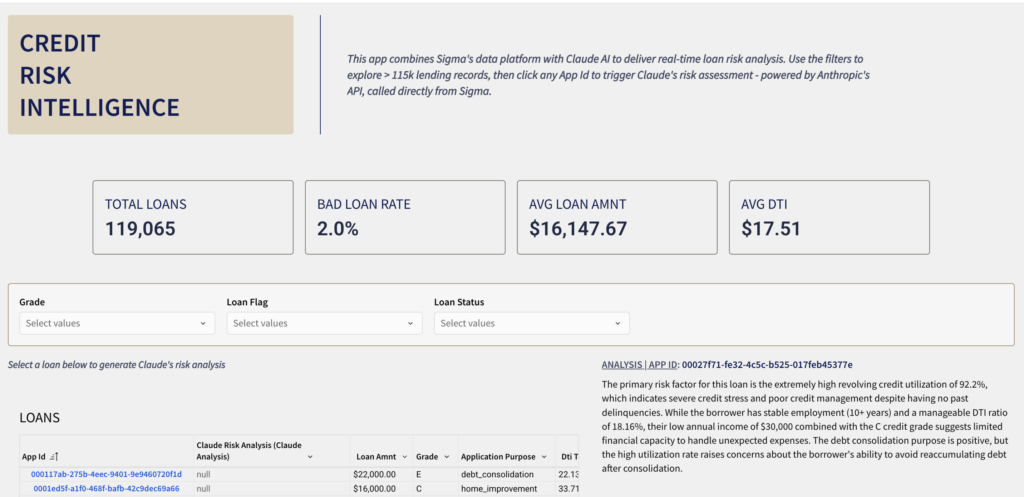
2026 Week 19 | Sigma: AI Credit Risk Analysis

Introduction This week’s challenge explores something entirely new for Sigma – calling an external AI API directly from a workbook action. Using Sigma’s API Connector and Action Sequences, you’ll build a Credit Risk Intelligence app that sends live loan data to Claude’s AI and displays a real-time risk explanation – all without leaving Sigma. Need Access

2026 Week 19 | Sigma: AI Credit Risk Analysis Read More »

Sigma, Workout Wednesday
2026 Week 07 | Sigma: Building a Custom Plugin with AI

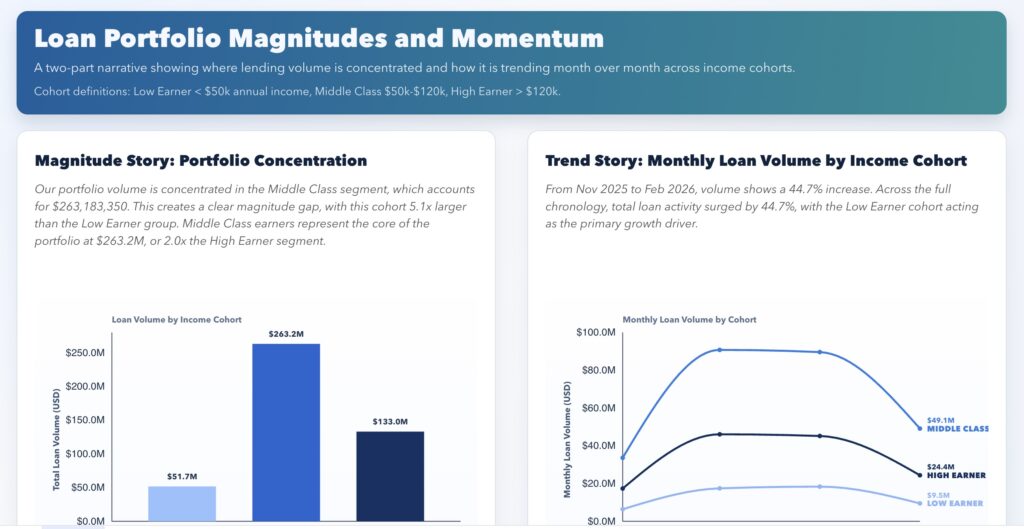
Introduction This week’s Workout Wednesday challenge was Numbers of Different Magnitudes, but the bigger lesson for me was this: You can build custom analytical experiences in Sigma using AI. For this submission, I used AI-assisted coding to create a custom Sigma plugin (React + D3) that goes beyond standard chart behavior. It combines a magnitude view

2026 Week 07 | Sigma: Building a Custom Plugin with AI Read More »

Sigma, Workout Wednesday
2026 Week 03 | Sigma: Running Feedback Loop

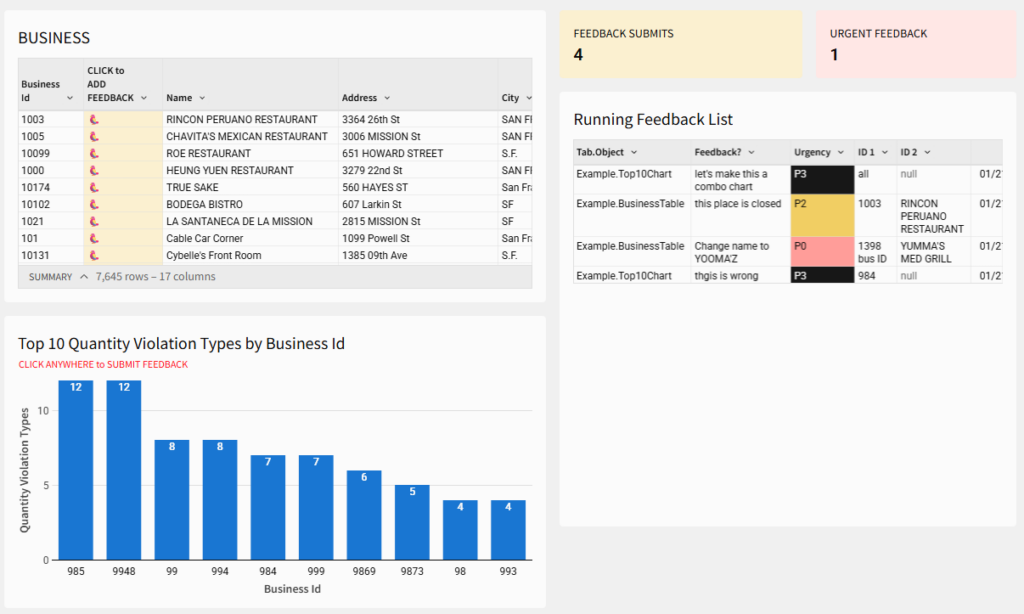
Introduction This week’s Workout Wednesday is about turning feedback into part of the workflow, not a side conversation. You’ll build a lightweight, in-workbook feedback loop in Sigma that lets stakeholders flag issues directly on tables and charts, with context intact. Instead of comments that disappear or Slack messages that pile up, feedback becomes structured, reviewable,

2026 Week 03 | Sigma: Running Feedback Loop Read More »

Sigma, Workout Wednesday
2025 Week 50 | Sigma: Find the Leak with Hierarchies

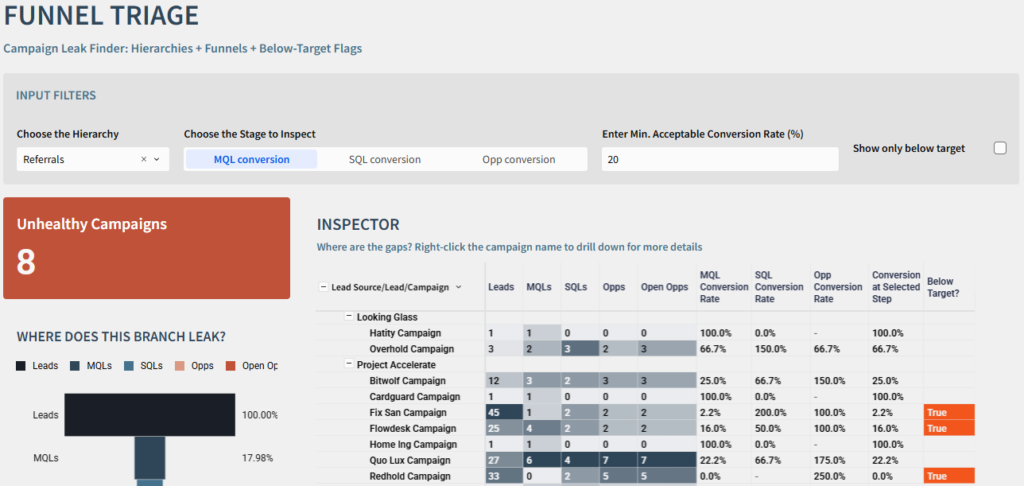
Say hi to hierarchies Introduction This week, we’re turning hierarchies into a decision tool. Using Sigma’s ragged hierarchies, hierarchy controls, and funnel charts, you’ll build a Campaign Leak Finder that pinpoints exactly where your funnel is breaking down. You’ll create a navigable tree from Lead through Campaign, wire it to a live funnel, and layer

2025 Week 50 | Sigma: Find the Leak with Hierarchies Read More »

Sigma, Workout Wednesday

2025 Week 41 | Sigma: Can You Make an Interactive Forecasting Tool?

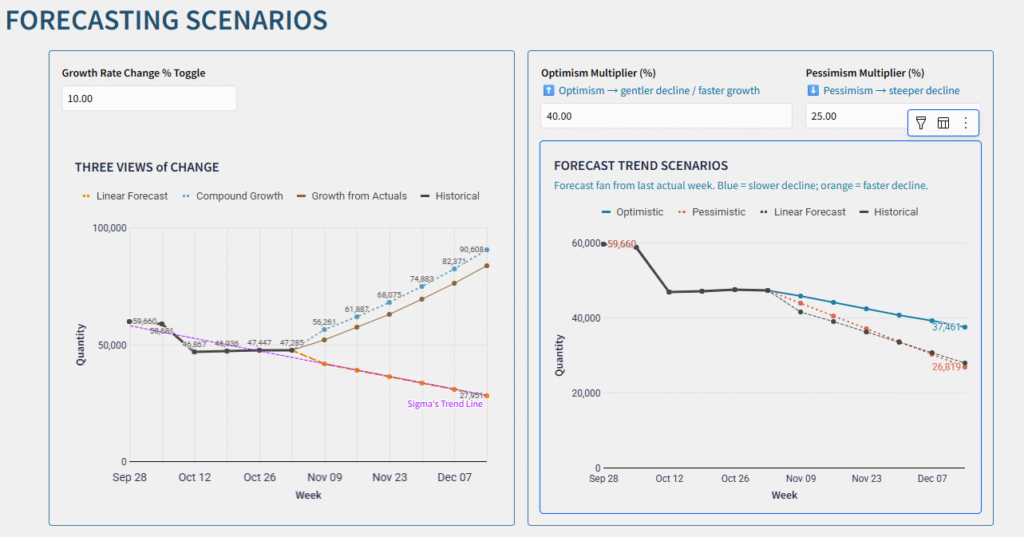
Can you build an interactive forecasting app? Introduction This week, we’re turning forecasting into action. Using Sigma’s RegressionSlope() and RegressionIntercept() functions, you’ll build a live forecasting app that projects future outcomes—and adjusts in real time. No Excel exports. No FORECAST() formulas. Just your dataset, an input table, and a few calculated fields to model linear,

2025 Week 41 | Sigma: Can You Make an Interactive Forecasting Tool? Read More »

Sigma, Workout Wednesday

2025 Week 41 | Sigma: You Should If, or Else

Can you create an if-else action workflow? Introduction This week, we’re exploring how Sigma’s new if-else Action transforms dashboards into decision apps. Instead of static filters and views, you’ll build a responsive experience that changes based on what users select. The goal isn’t just to add logic – it’s to streamline ad-hoc work. With a

2025 Week 41 | Sigma: You Should If, or Else Read More »

Sigma, Workout Wednesday