
Introduction
Welcome to Week 42 of 2026!
You built a Sigma App that addressed a critical business process and could possibly replace a legacy SaaS solution, but the workbook takes forever to load due to complex transformations and workarounds in Sigma.
This Sigma Workbook Query Performance Optimizer combines Sigma workbook metadata from API endpoints and Snowflake query history to help you identify compile-time bottlenecks that could be replaced, optimized, or moved to your data warehouse.
To complete this challenge, you will need to have or set up your own Sigma and Snowflake Sandbox environment, where you have to load metadata through Sigma API.
Good luck!
-Stanley
Need access to Sigma Public?
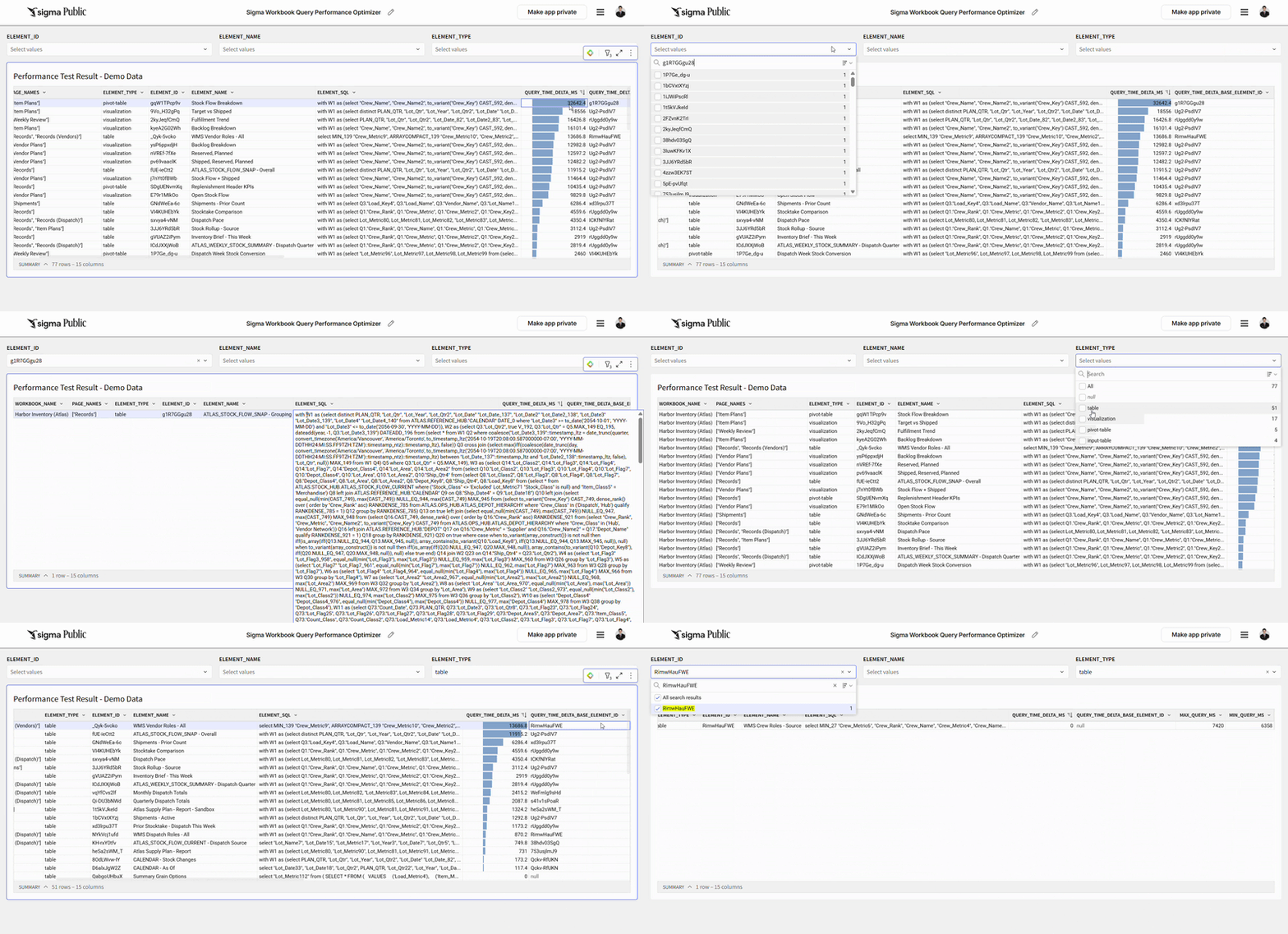
Requirements
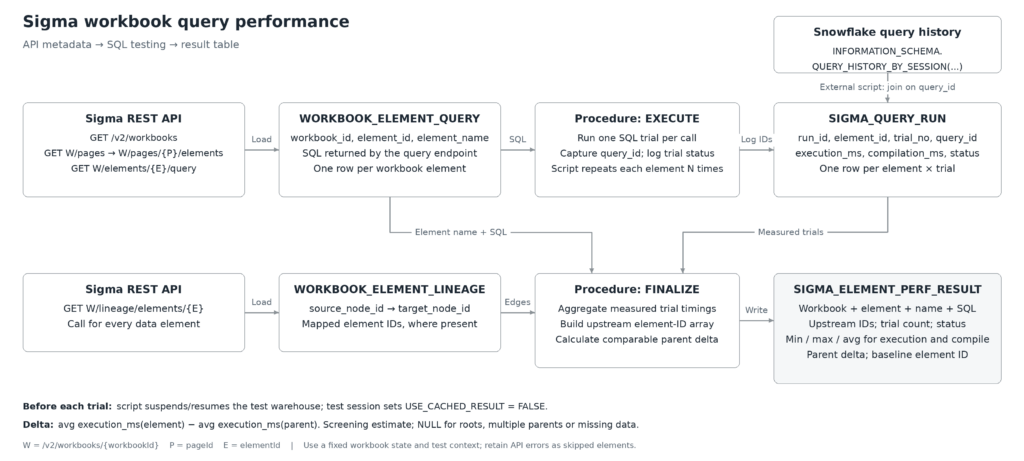
Step 1 pulls the element names and SQL out of Sigma. Write an extraction script, lists workbooks through /v2/workbooks, then walks each workbook’s /pages and /pages/{pageId}/elements endpoints. For each data element, call /v2/workbooks/{workbookId}/elements/{elementId}/query to retrieve its SQL. Follow nextPage wherever pagination is supported, and retain errors or missing SQL as skipped elements. help.sigmacomputing.com
Step 2 lands the SQL and lineage in two Snowflake tables. Load WORKBOOK_ELEMENT_QUERY with the workbook ID, element ID, element name and SQL text. Separately, call /v2/workbooks/{workbookId}/lineage/elements/{elementId} for every data element. Its response contains dependency nodes and source-to-target edges. Flatten these into WORKBOOK_ELEMENT_LINEAGE, preserving node IDs and mapping them to element IDs where available. Deduplicate repeated edges; the source is upstream of the target. Keep SQL and lineage aligned to the same workbook state. Sigma Documentation
Step 3 runs each element’s SQL repeatedly under consistent conditions. The controlling script loops through the elements and calls the procedure’s EXECUTE phase once per trial—for example, five trials per element. Before each call, it suspends and resumes a dedicated test warehouse to clear its local data cache and sets USE_CACHED_RESULT = FALSE on the test session to prevent result reuse. Keep warehouse size, role and source data constant. The procedure executes the stored SQL unchanged, captures the child query’s ID, and writes a record to SIGMA_QUERY_RUN with the run ID, element ID, trial number and status. Snowflake Documentation
Step 4 fills the trial log with Snowflake’s measured timings. After execution, the external script reads INFORMATION_SCHEMA.QUERY_HISTORY_BY_SESSION for the test session and joins its results to SIGMA_QUERY_RUN using the captured query ID. It records EXECUTION_TIME and COMPILATION_TIME in milliseconds, measuring the element’s SQL rather than the enclosing procedure call. This collection happens outside the procedure because Snowflake does not allow these query-history functions inside stored procedures. Retry missing history records and keep failed trials visible. Snowflake Documentation
Step 5 builds the final performance table. The procedure’s FINALIZE phase groups successful trials by element and calculates minimum, maximum and average execution and compilation times separately. It joins back the element names and SQL, traverses the lineage table to build a distinct array of upstream element IDs, and writes one row per run and element into SIGMA_ELEMENT_PERF_RESULT. For an element with exactly one comparable direct parent, calculate delta_ms = element average execution_ms − parent average execution_ms; otherwise leave the delta NULL. Use that difference as a screening estimate, then confirm any proposed transformation change with a controlled before-and-after test.
Dataset
Your own sandbox metadata
Share
After you finish your workout, share on LinkedIn, Sigma’s Community page, (or Twitter) using the hashtags #WOW2026 and #Sigma, and tag Ashley Bennett, Stanley Gai, Jessica Batten, Eric Heidbreder, and Carter Voekel!
Also, make sure to fill out the Submission Tracker so that we can count you as a participant this week to track our participation throughout the year.