
Introduction
This week, we will leverage AI functions and CallNumber warehouse functions to explore the possibility of Sigma’s scheduled action trigger.
Imagine you are the branch manager of a customer support center and a ticket assignment has to be sent out every morning to all your agents, such that each agent will have a list of tickets to work on, derived from a queue that has accumulated overnight during the office shutdown.
This automated workflow shall send out the agent-specific ticket list to each agent automatically in the morning at a cutoff timestamp.
Good luck!
Stanley
Need access to Sigma?
Note: You will only have view access to WOW Workbooks, Folders, and Workspaces, not edit access. Please create your WOW Workbooks under “My Documents.” We suggest creating a folder to organize all your workbooks.
Requirements
- Admin Page
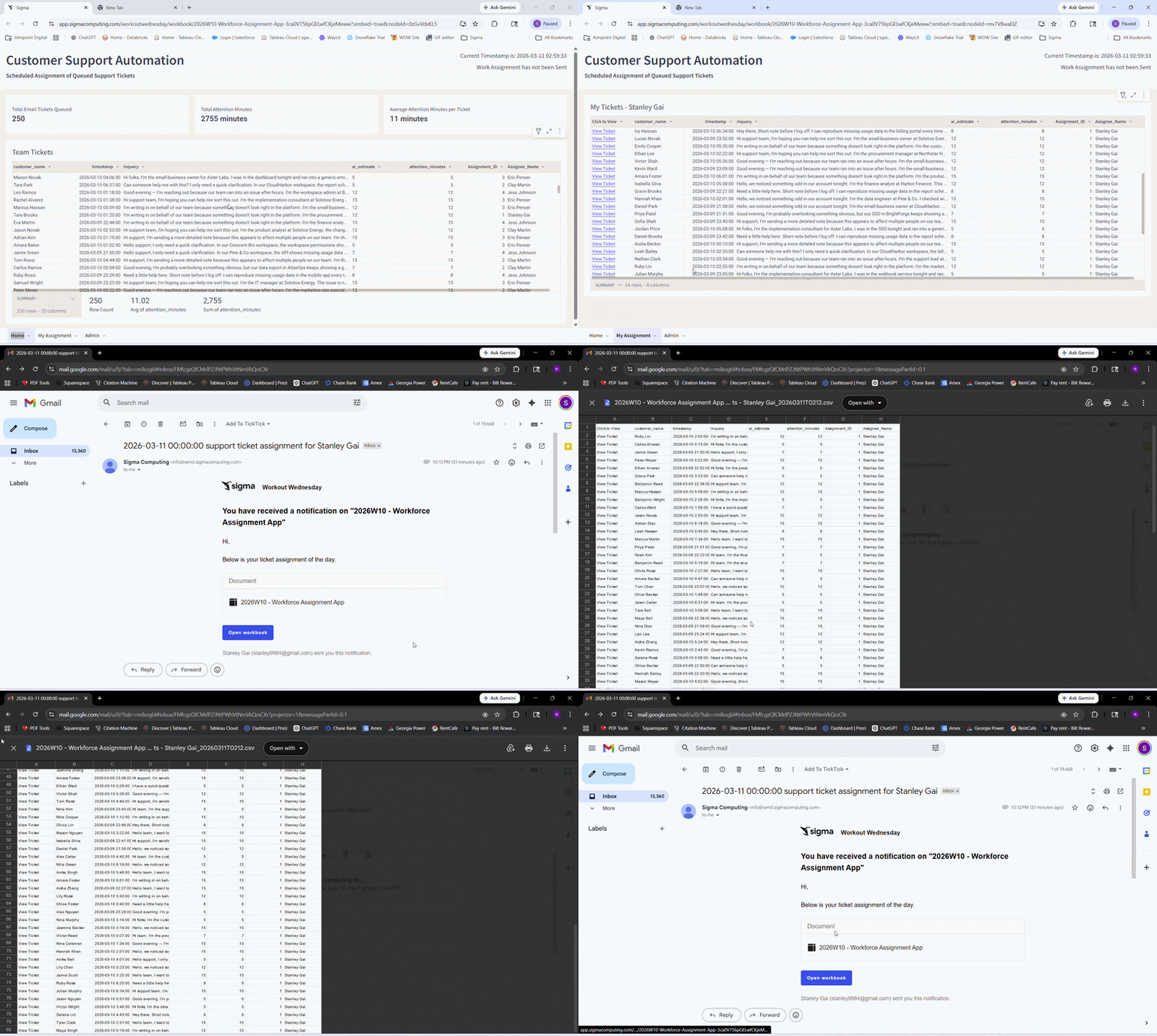
- Create an Assignee input table for Agents’ Name, Email, ID
- Enter a few rows of fake information (my sure to include your email to see the export result)
- Home Page:
- Table element sourced from: Workspaces / Workout Wednesday / 2026 / 2026W10 Workforce Assignment App / Support Center Data Model / Email_Queue
- Create a new column using Cortex AI Complete and prompt it to estimate the amount of time (in minutes) to resolve the inquiry as a customer support agent.
- Create a numeric column to convert the AI response into a number (in minutes)
- Create an Assignee_ID column and call snowflake UNIFORM function to randomly return a uniformly distributed integer between a number range. (This should be determined by how many rows of fake agent data you entered)
- Create a lookup column to lookup agent name by ID
- Create KPI cards to display:
- Total Email Tickets Queued
- Total Attention Minutes (AI estimated)
- Average Attention Minutes per Ticket (AI estimated)
- Creat page header and add text UI elements as needed
- Table element sourced from: Workspaces / Workout Wednesday / 2026 / 2026W10 Workforce Assignment App / Support Center Data Model / Email_Queue
- My Assignment Page:
- Create a child table of the Email_Queue table from home page
- Utilize the currentuserfullname or currentuseremail function to apply RLS on this child table so each agent can only see their own tickets
- Workbook level scheduled action:
-
- Configure a Notify and Export action to run daily at a fixed timestamp in the morning
- Configure dynamic recipients for all email addresses in the Admin page Assignee Input Table
- Edit the message and email title
- Attach link navigation to the email and take users to the “My Assignment” page
- Attach a csv of the RLS-applied ticket table.
- Bonus: Add an if logic to compare total estimated minutes and staffable minutes, and send an alert email to the branch manager to allocate additional staffing when necessary
- Configure a Notify and Export action to run daily at a fixed timestamp in the morning
Dataset
- Workspaces / Workout Wednesday / 2026 / 2026W10 / Support Center Data Model
Share
After you finish your workout, share on LinkedIn, Sigma’s Community page, (or Twitter) using the hashtags #WOW2026 and #Sigma, and tag Ashley Bennett, Eric Heidbreder, Jessica Batten, Carter Voekel and Stanley Gai!
Create an interactive, sharable version of your solution here.
Also, make sure to fill out the Submission Tracker so that we can count you as a participant this week to track our participation throughout the year.