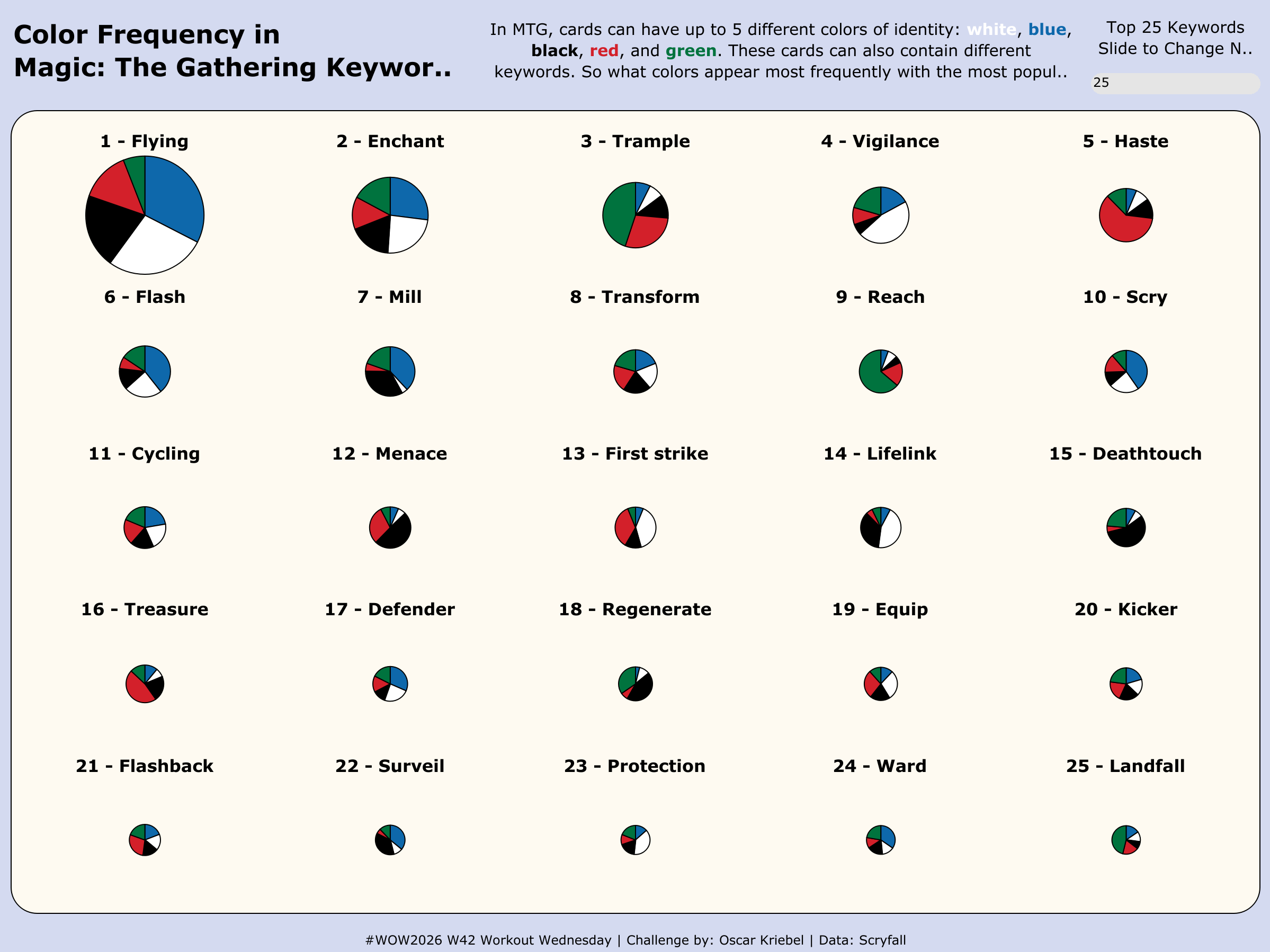
#WOW2026 Week 42: Can you create a small multiple pie chart?

Introduction

This week we have a challenge set by a fellow Data School Consultant, Oscar Kriebel. Yes you read that correctly another Kriebel in the Tableau World. 

Oscar kindly volunteered to submit a challenge for this week. Whilst I don’t agree with seeing so many Pie Charts, the techniques are interesting! Have fun!

Requirements

  • Dashboard size: 1200 x 900
  • Font: Verdana
  • One worksheet: Trellis/Small Multiple Pie Chart
  • Trellis Pie Chart:
    • Split by Keyword
    • Pie chart:
      • Split by Color Identity
      • Angle by Number of Cards with that Color Identity
      • Sized on the total number of unique cards with a keyword
    • Title based on the Keyword
      • Include ranking of the total number of unique cards
    • Parameter to include Top N Keywords
      • 1 to 25 for N
    • Filter to Top N Keywords based on parameter
    • Trellis should be sized on the number of Keywords allowed automatically
  • Colors used in dashboard:
    • Background color: #d4daf0
    • Chart background: #fefaf1
    • White: #ffffff
    • Black: #000000
    • Green: #00733e
    • Blue: #0e68ab
    • Red: #d3202a

Dataset

Available from here.

Attribute

When you publish your solution on Tableau Public make sure to take the time and include a link to the original inspiration.  Also include the hashtag #WOW2026 in your description to make it searchable!

Share

After you finish your workout, share on Twitter and/or LinkedIn using the hashtag #WOW2026 #Tableau and tag @WorkoutWednsday

Solution

Interactive