
Introduction
Imagine you are the Senior Customer Success Manager at a SaaS company that runs on a subscription model, and you are responsible for reviewing complaint resolutions proposed by junior-level agents.
This week, we are bringing Snowflake AI_Sentiment(), AI_Classify(), and AI_Complete() functions into Sigma AI App.
Good luck!
Stanley
Need access to Sigma?
Note: You will only have view access to WOW Workbooks, Folders, and Workspaces, not edit access. Please create your WOW Workbooks under “My Documents.” We suggest creating a folder to organize all your workbooks.
Requirements
- Data Page
- Table element sourced from: Workspaces / Workout Wednesday / 2026 / 2026W18 AI Complaint Resolution Center / AI Complaint Resolution Center Data / Complaints
- Built a child table of that table and name it Complaints with AI Review. Create the following calculated columns:
- AI Sentiment: Use CallVariant function to call SNOWFLAKE.CORTEX.CLASSIFY_TEXT with an array of categories (“Neutral”, “Dissatisfied”, “Frustrated”, “Angry”, “Distressed”, “Churn Risk”). Make sure to convert the final return to a text
- AI Compensation Category: Use CallVariant function to call SNOWFLAKE.CORTEX.COMPLETE with a prompt and the text value from the Agent Note column. In your prompt, ask the LLM to return one of the following Compensation Categories: None, Apology Only, Fee Waiver, $25 Credit, $75 Credit, One Month Free, or Full Refund. Provide an example or bound for each Compensation Category. For example, “Full Refund = customer paid for a service/product that was not delivered, legal/regulatory risk, or severe company fault. ” Make sure to convert the final return to a text.
- Need Review: Check if Agent Compensation Category = AI Compensation Category, return a True/False boolean.
- Build a linked input table off the table above and create a text column to collect the reviewer overwritten Compensation Category, name it Review Compensation Overwrite
- (Pro tip: In the real world, you would want to materialize the table with AI functions before the linked input table to improve performance. For the WOW challenge, it’s fine:-)
- Home Page
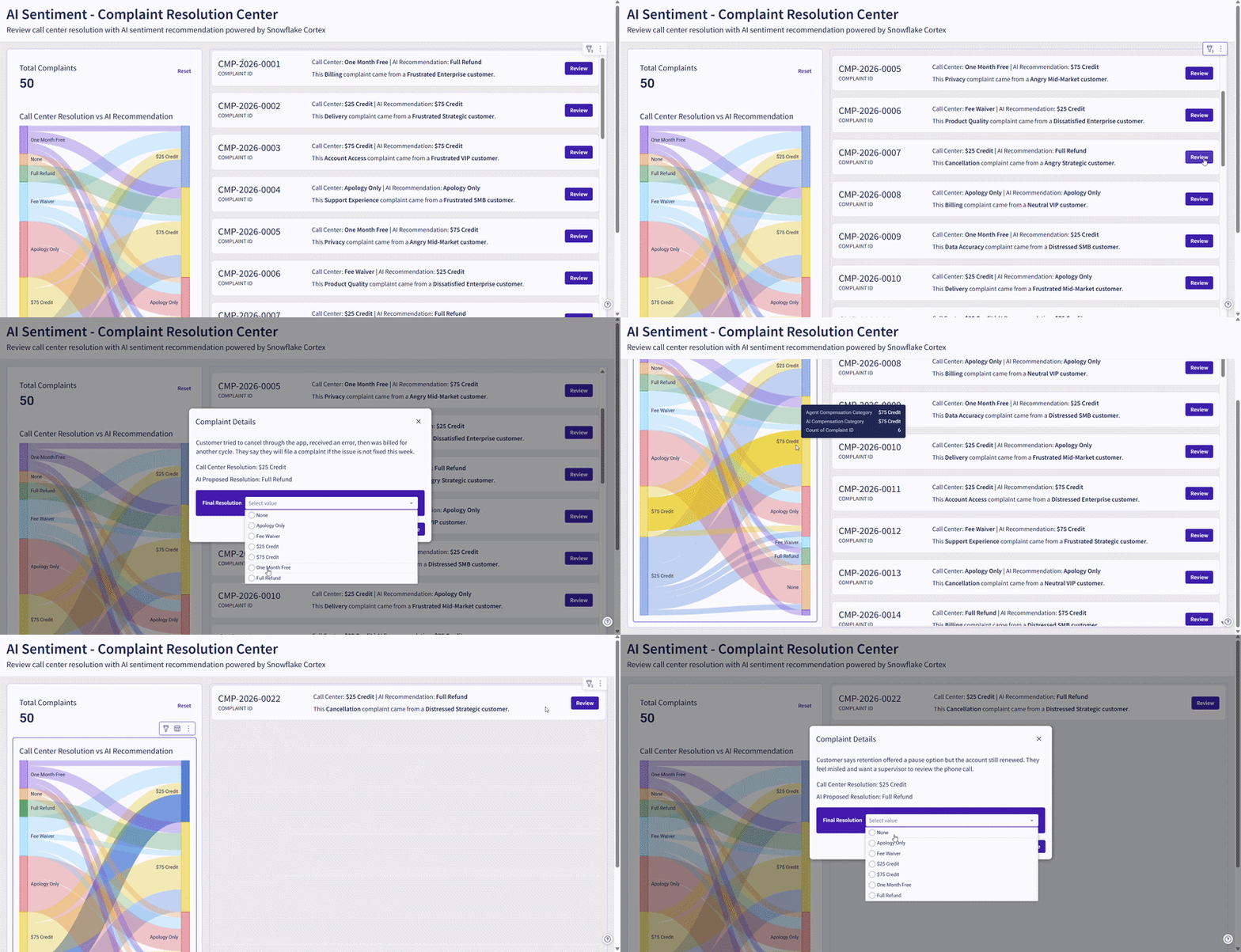
- Create Page Header for UI
- Create a container, add:
- A KPI Card for Total Complaints
- A Sankey Chart to show how Call Center Agent Compensation Category for each complaint case compares to AI Compensation Category we derived from Snowflake Cortex.
- A repeated container based off the linked input table, add:
- Text UI to dynamically show:
- Complaint ID
- Complaint AI Sentiment
- Complaint Area
- Complaint Customer Segment
- Call Center Compensation Category
- AI Suggested Compensation Category
- A button to open a modal that:
- Display Complaint Agent Notes
- Call Center Compensation Category
- AI Suggested Compensation Category
- A Single Select Control to let the user select an overwrite value
- A button to confirm overwrite
- Configure Update Row Action to overwrite Review Compensation Category
- Text UI to dynamically show:
- Leverage hidden controls to allow users to click on a lineage of the Sankey Chart and filter the Complaint IDs in the Repeated Container
Dataset
- Workspaces / Workout Wednesday / 2026 / 2026W18 / AI Complaint Resolution Center
Share
After you finish your workout, share on LinkedIn, Sigma’s Community page, (or Twitter) using the hashtags #WOW2026 and #Sigma, and tag Ashley Bennett, Eric Heidbreder, Jessica Batten, Carter Voekel and Stanley Gai!
Create an interactive, sharable version of your solution here.
Also, make sure to fill out the Submission Tracker so that we can count you as a participant this week to track our participation throughout the year.