Author name: Meagan Longoria

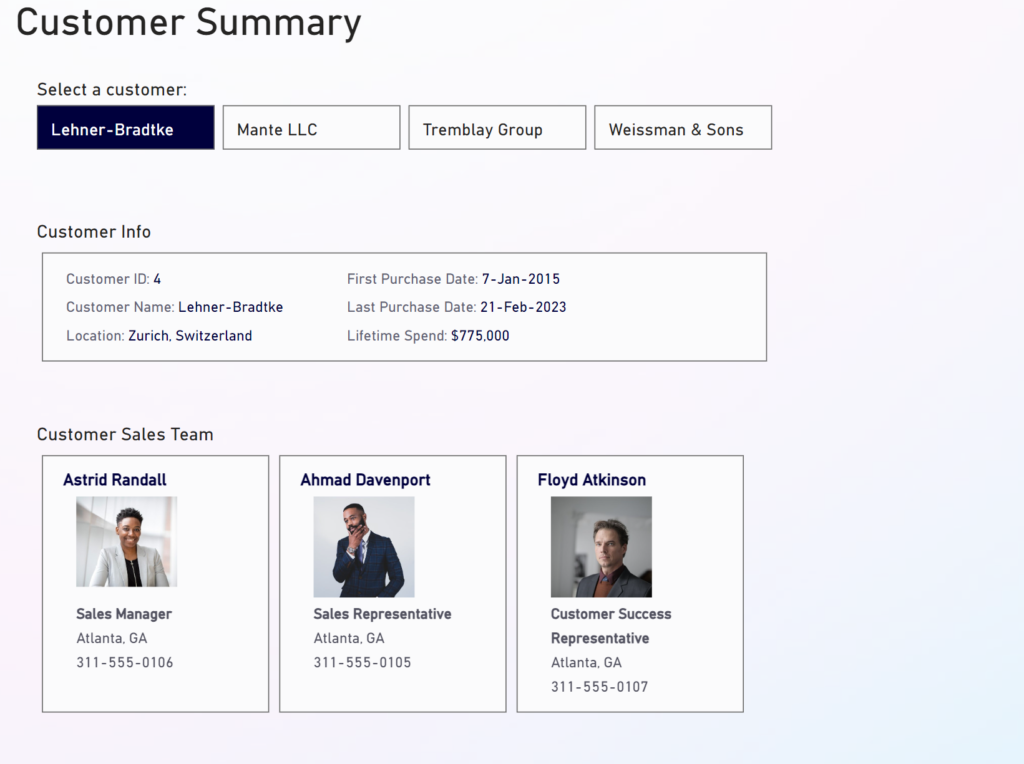
2024 Week 12 | Power BI: Contact Cards and Headerless Tables

Introduction This week’s challenge uses a custom visual to achieve some formatting that cannot currently (as of March 2024) be achieved using core visuals. First, we have a table that contains 2 columns and no headers. Next, we have some contact cards that contain both an image and text. The catch is that the number […]

2024 Week 12 | Power BI: Contact Cards and Headerless Tables Read More »

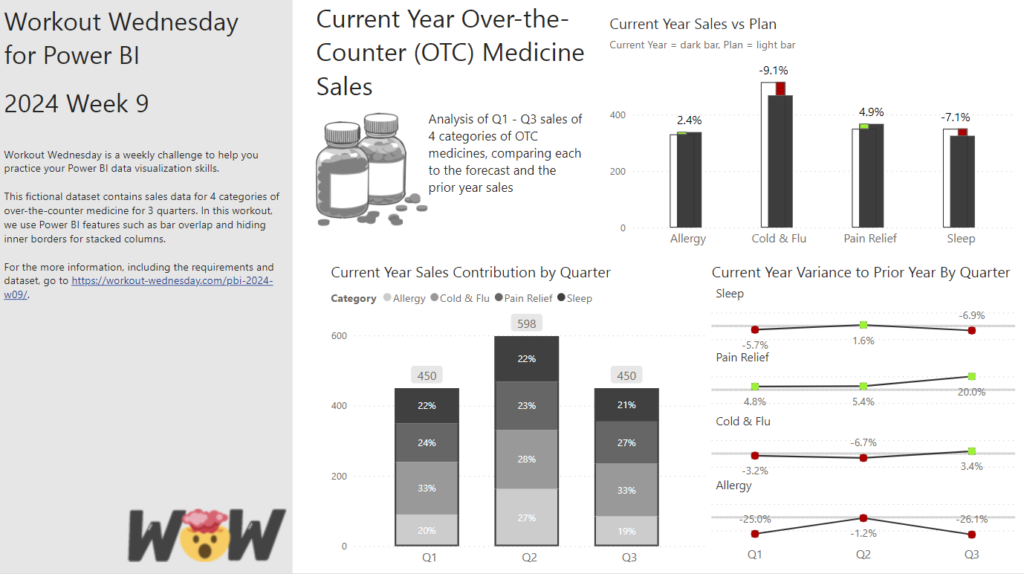
2024 Week 9 | Power BI: Use Bar Overlap and Border Formatting

Introduction Welcome to this week’s Workout Wednesday. This week, we are taking advantage of some new features in the February 2024 release of Power BI Desktop. We can now have bars overlap in a clustered column chart and hide the inner borders in a stacked column chart. This week, we’ll use those formatting options to

2024 Week 9 | Power BI: Use Bar Overlap and Border Formatting Read More »

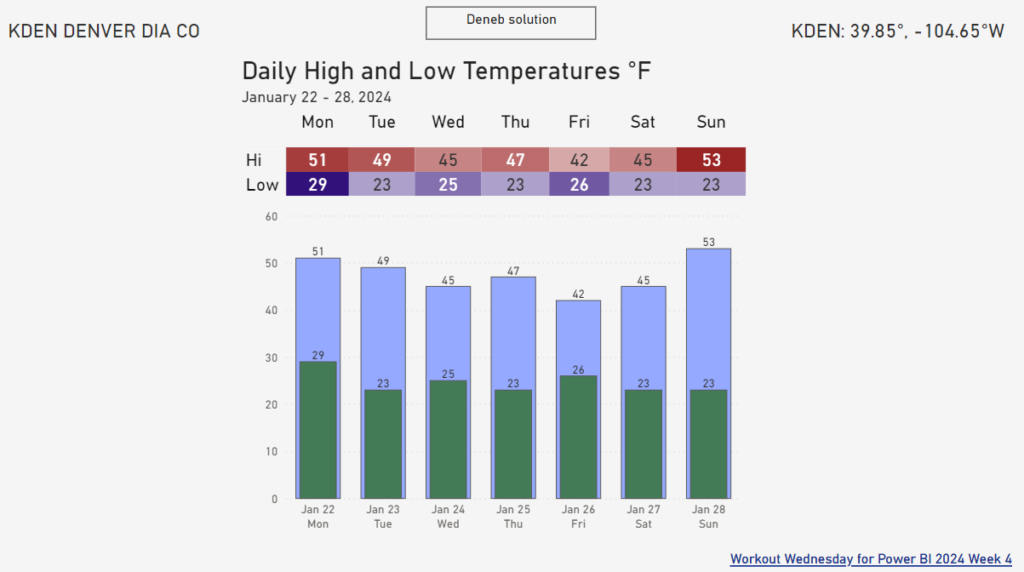
2024 Week 4 | Power BI: Recreate this weather visual with overlapping columns

Introduction I keep seeing a particular visual shared by a Denver-area meteorologist on social media. It seems to be output from weathermodels.com.  I thought it might be fun to make a modified version in Power BI, so that is our challenge this week. While we don’t have native overlapping columns, there is a native solution

2024 Week 4 | Power BI: Recreate this weather visual with overlapping columns Read More »

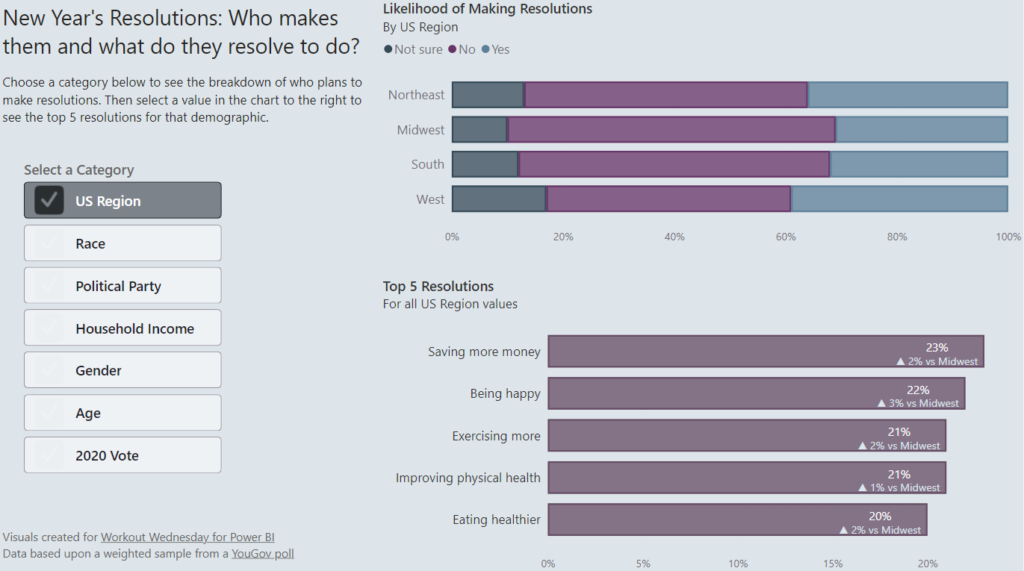
2023 Week 52 | Power BI: Format Bar Charts with Transparency, Borders, and Detail Labels

Introduction In the December 2023 release of Power BI Desktop, some new formatting options were added for bar charts. These enhancements allow us to add borders around bars (and segments of bars for stacked bar charts), change the transparency of the fill color in a bar, and add secondary metrics to data labels.  With the

2023 Week 52 | Power BI: Format Bar Charts with Transparency, Borders, and Detail Labels Read More »

2023 Week 43 | Power BI: Faceted Stacked Bar Chart Comparison

Introduction This week’s challenge looks at two options for making faceted charts with multiple measures: the Deneb custom visual and the Stacked Bar Chart core visual. The charts compare two different measures across two attributes. You’ll have to get a little creative to accomplish this in both chart types.  Requirements Get the sample dataset from

2023 Week 43 | Power BI: Faceted Stacked Bar Chart Comparison Read More »

2023 Week 27 | Power BI: Power Query Simple Pagination and a Treemap

Introduction This week we are going to have some fun with Power Query to obtain data from a website that spans multiple pages and then visualize the data in a treemap. Treemaps are meant to display hierarchical data as a set of nested rectangles. They aren’t a great replacement for bar charts when minor differences

2023 Week 27 | Power BI: Power Query Simple Pagination and a Treemap Read More »