
Introduction
Data labels in Power BI do more than show a number. In bar and column charts, the Data labels card has several parts:
– Value: the main number on each bar.
– Title: an optional line above the value.
– Detail: a second line where you can show a different field or measure, with its own font, size and color.
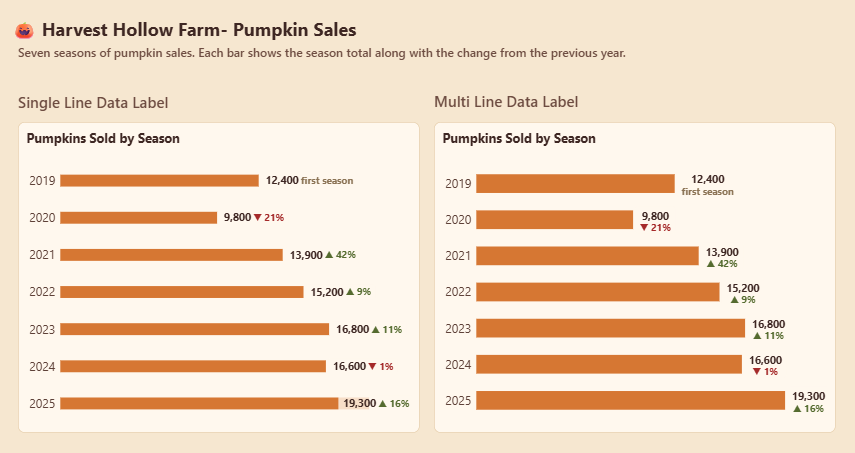
You can also choose how these parts are arranged with the Layout option:
– Multi-line stacks them, with the detail sitting under the value.
– Single-line places them side by side.
This week you’ll use Detail to add year-over-year (YoY) context to every bar. Each bar will show the season total, with a colored arrow and % change underneath, so the chart tells the whole story at a glance without tooltips.
Dataset
The dataset is a single Excel file found on GitHub at:
https://github.com/datapopanalytics/WorkoutWednesdayPowerBI/blob/main/Data%20Labels/Pumpkins%20Sold.xlsx
Requirements
-
Import the dataset into Power BI.
-
Build the required measures:
– Pumpkins: Total pumpkins sold.
– Pumpkins PY: The prior year’s total.
– Pumpkins YoY %: The change compared with the prior year.
– Pumpkins YoY Label: A text measure that returns ‘first season’ when there’s no prior year, ‘▬ steady’ when the change is within ±1%, ‘▲ x%’ for growth and ‘▼ x%’ for a decline
– Pumpkins YoY Color: A hex color measure: #556B2F for growth, #A52A2A for a decline, and #8B7355 for steady or first season. -
Build a clustered column chart with Year on the X-axis and Pumpkins on the Y-axis. (Don’t forget to set the sort)
-
Do the basic formatting, such as setting padding, removing gridlines and adding a title.
-
Turn on Data labels and format them however you like, for example by changing the font size and color.
-
Turn on Detail under Data labels, add Pumpkins YoY Label, and format it to your liking.
-
Set the Detail color with fx → Field value → Pumpkins YoY Color, so growth shows green and declines show red.
-
Under Data labels → Layout, choose Multi-line or Single-line, whichever reads better.
Share
After you finish your workout, share on BlueSky or LinkedIn using the hashtags #WOW2026 and #PowerBI, and tag @MMarie, @shan_gsd, @KerryKolosko (on BlueSky). Tag Lakshmi Ponnurasan on LinkedIn.