
Introduction
Welcome to Week 38 of 2026!
Have you:
- Share a workbook with a user but some workbook elements pop permission errors?
- Are about to sunset a table but not sure which Sigma object it references?
- Taking over someone’s dev work but not sure what data objects it references?
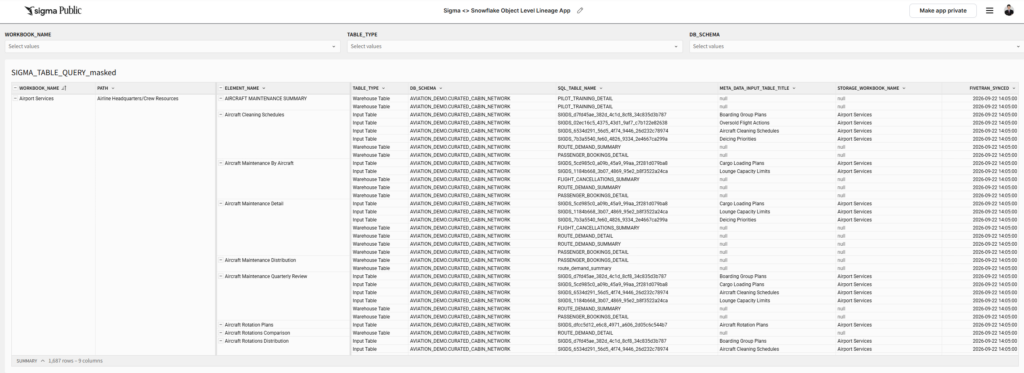
This Sigma <> Snowflake Object Level Lineage App combines Sigma workbook metadata from API endpoints and Snowflake object metadata under INFORMATION_SCHEMA to offer a Workbook – Element – Snowflake Table perspective of your object lineage.
To complete this challenge, you will need to have or set up your own Sigma and Snowflake Sandbox environment, where you have to load metadata through Sigma API.
Good luck!
-Stanley
Need access to Sigma Public?
Requirements
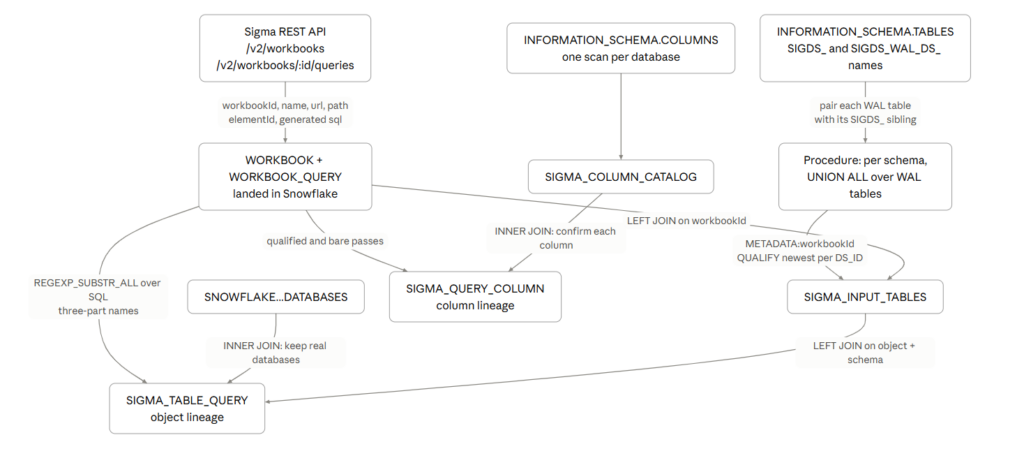
Step 1 pulls the metadata out of Sigma. You write an extract job in whatever language your team already uses. It exchanges client credentials for a bearer token at /v2/auth/token, lists workbooks from /v2/workbooks, then calls /v2/workbooks/{workbookId}/queries once per workbook to get the SQL Sigma generates for each element. Both list endpoints page through page and nextPage, and the token lasts an hour.
Step 2 lands that metadata in Snowflake so SQL can join to it. Either point a managed connector at Sigma, which handles auth and pagination for you, or stage the JSON yourself and MERGE it into shape. Everything downstream needs only two tables: WORKBOOK for names and URLs, and WORKBOOK_QUERY carrying elementId, the workbook id, and the SQL text, plus a soft-delete flag so you can tell when an element disappears.
Step 3 recovers which workbook owns each Sigma input table. The warehouse names don’t say — Sigma materializes each input table as SIGDS_<id> with a write-ahead-log table SIGDS_WAL_DS_<id> beside it, and only the log’s METADATA column records the link back. A stored procedure discovers those log tables from INFORMATION_SCHEMA.TABLES, builds a UNION ALL across them and runs it with EXECUTE IMMEDIATE, reads METADATA:workbookId, and keeps the newest row per table using QUALIFY ROW_NUMBER().
Step 4 turns workbook SQL into one row per object reference. This is a single view and the shortest step in the build. REGEXP_SUBSTR_ALL pulls every three-part name out of the SQL text, LATERAL FLATTEN expands the matches into rows, an inner join to SNOWFLAKE.INFORMATION_SCHEMA.DATABASES discards the matches that aren’t real references, and a TABLE_TYPE expression marks each object as an input table or a warehouse table.
Step 5 does the same thing at column grain, and is optional. Snapshot INFORMATION_SCHEMA.COLUMNS into a SIGMA_COLUMN_CATALOG table, since joining it live is too slow. A view then runs a qualified pass for alias."Column" references and a bare pass for unqualified select lists, and inner-joins the catalog to drop every candidate that isn’t a real column of that object.
Dataset
Your own sandbox metadata
Share
After you finish your workout, share on LinkedIn, Sigma’s Community page, (or Twitter) using the hashtags #WOW2026 and #Sigma, and tag Ashley Bennett, Stanley Gai, Jessica Batten, Eric Heidbreder, and Carter Voekel!
Also, make sure to fill out the Submission Tracker so that we can count you as a participant this week to track our participation throughout the year.