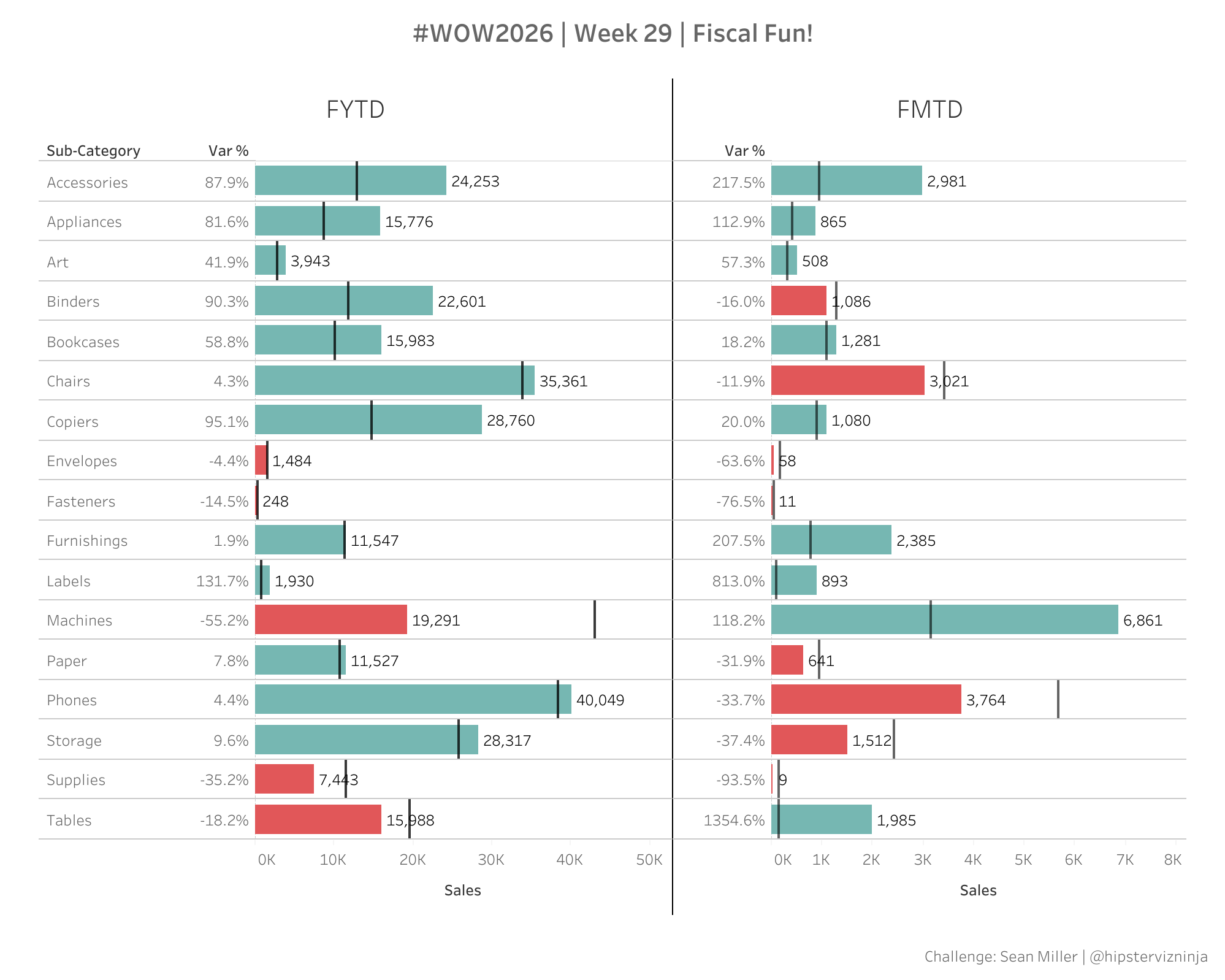
Welcome to week 29! I’m so excited to be back with another interesting challenge. It occurred to me recently that we’ve been using Sample – Superstore for decades and there is no shortage of date filter tips and tricks but they are all based on traditional Gregorian calendars.
And I’ve yet to work with a single retail client who does anything on calendar dates! Rather they all use a version of a retail calendar. These calendars essentially offset the calendar so that the year begins on the first Sunday of January and will split each quarter of the year into one of 3 variations:
4-5-4
4-4-5
5-4-4
What this means is that each month of the quarter are always split by month 1 is 4 weeks, month 2 is 5 weeks and month 3 is 4 weeks. This allows for 1:1 comparison for YOY comps.
So let’s play with it. I’ve uploaded a common version of the 4-4-5 retail calendar. You will need to create a relationship between Superstore and the calendar on order date. Then you’ll need to use some fancy table calcs to get the view to tie out.
When you publish your solution on Tableau Public make sure to take the time and include a link to the original inspiration. Also include the hashtag #WOW2026 in your description to make it searchable!