Introduction
I am excited to begin my third year as a Workout Wednesday coach! This year, I remain committed to providing challenges that help you flex your Tableau muscles and maintain your analytical strength.
This week’s challenge is inspired by a real-world scenario I encountered recently. While building a dashboard to track service usage, I was tasked with implementing a date filter and a hierarchical drill-down. Shortly after the initial build, a new requirement arrived: the usage rate needed to be calculated based on the selected hierarchy, and users with no activity (no records) during the selected period must still be included in the denominator.
Let’s use our trusty Sample Superstore dataset to practice this essential data densification workout!
Requirements
- Requirements Dashboard size: 1366 x 768
- Number of sheets: 2
- Create a hierarchy for Category > Sub-Category > Manufacturer.
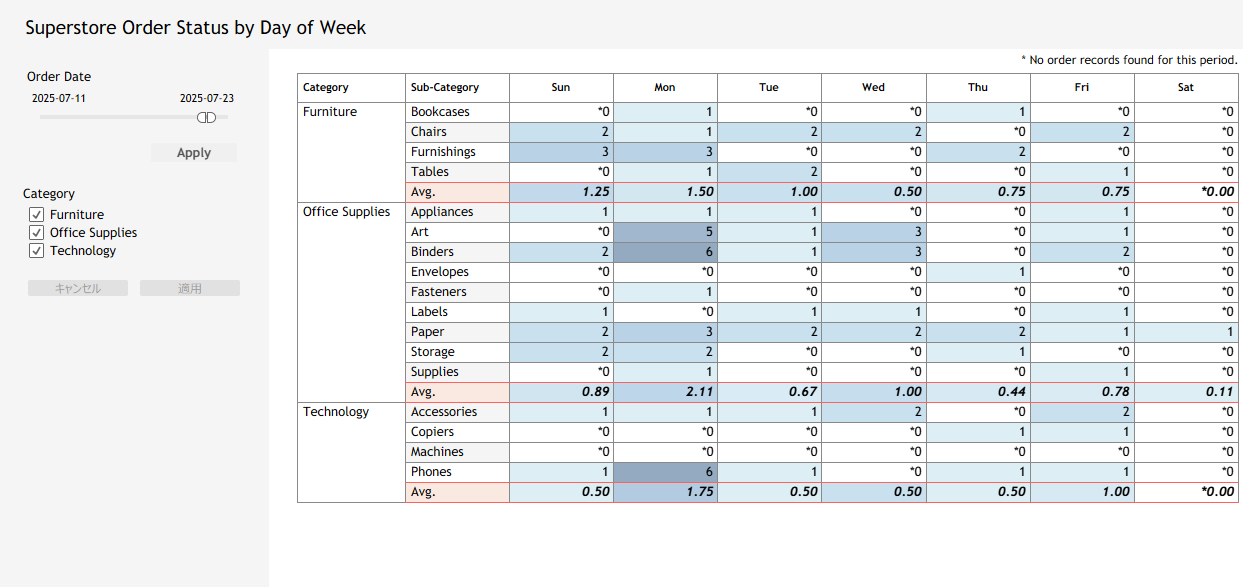
- Build a crosstab showing the number of orders by Day of Week at the Sub-Category level.
- Add a filter for Order Date.
- Display the average number of orders for both Sub-Category and Manufacturer levels.
Note: You must account for nulls—items with no orders during the selected period must be included in the denominator of the average calculation. - Color-code the crosstab by the number of orders (feel free to choose your own color palette). Ensure the average rows are also color-coded based on their values.
- Tooltips & Formatting: You don’t need to match the tooltips or other minor formatting exactly.
BONUS
- If you have some extra time, I encourage you to use this as an opportunity to dive into Tableau’s formatting settings and experiment with the look and feel!
Dataset
This challenge uses the Sample Superstore dataset, with Product Name grouped as Manufacturer.
You can find the data source from here.
Attribute
When you publish your solution on Tableau Public make sure to take the time and include a link to the original inspiration. Also include the hashtag #WOW2026 in your description to make it searchable!
Share
After you finish your workout, share on X and/or LinkedIn using the hashtag #WOW2026 #Tableau and tag @WorkoutWednsday. Also, come join us in the Workout Wednesday channel on the Tableau Community Slack!