
Introduction
This week’s challenge features the new Repeating Container element, which is a powerful new visual that can display feed-like information quickly and easily. Today, I want to show you how you can use this feature to make more detailed KPI-like cards in your workbooks. This feature is still in beta – are there any things you’d like to see in the final version?
Need access to Sigma?
Note: You will only have view access to WOW Workbooks, Folders, and Workspaces, not edit access. Please create your WOW Workbooks under “My Documents.” We suggest creating a folder to organize all your workbooks.
Requirements
- Get your data
- Data Sources > Sigma Sample Database > RETAIL > PLUGS_ELECTRONICS > PLUGS_ELECTRONICS_HANDS_ON_LAB_DATA
- Fields: Date, Product Type
- Create your groupings for analysis
- Add Product Type to a group
- Add the Metrics ‘Profit‘, ‘Revenue‘, and ‘COGS‘ as calculations (go to the ‘Metrics’ section in the column selector)
- Create your visualizations
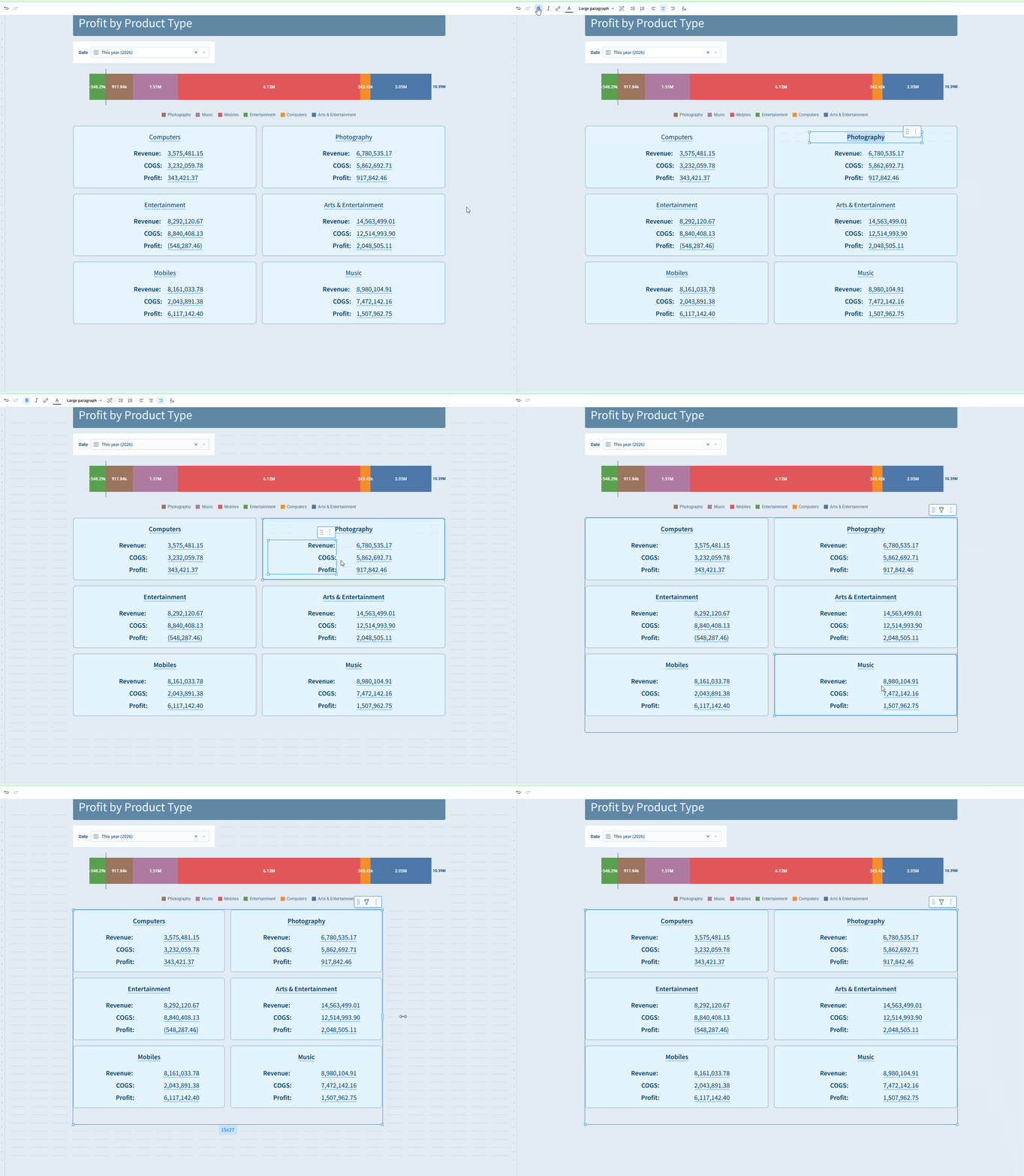
- In a new tab, add a Repeating Container UI Element
- Inside one of the containers, add a Text UI Element, set the source as the table you created above
- Press ‘=’ to open up the menu to extract fields from your underlying data
- First, pull in the ‘Product Type’, use a ‘Large Paragraph’ Text style, make it bold and centered
- Create another text element and add the metric names, Make these bold and Right Aligned
- Create a third text element, and use the ‘=’ sign to add in the calculations from your data. These can remain left-aligned.
- Adjust so the values are generally centered using the ‘Distribute Horizontally’ option when you select both of the elements
- Create a horizontal bar instead of a pie chart
- Add a bar chart element, then select the ‘horizontal’ image option
- Add ‘Sum of Profit’ to the X-Axis
- Add ‘Product Type’ under the ‘Color’ option
- Format Sum of Profit using ‘SI Units’
- Remove the X-axis gridlines and axis labels
- Show data labels *and* Bar total data labels
- Set the legend across the bottom of the visualization
- Turn off padding on the element and remove the background color
- Add a control on the date
- Add other formatting and titling as desired
Dataset
Data Sources > Sigma Sample Database > RETAIL > PLUGS_ELECTRONICS > PLUGS_ELECTRONICS_HANDS_ON_LAB_DATA
Share
After you finish your workout, share on LinkedIn, Sigma’s Community page, (or Twitter) using the hashtags #WOW2025 and #SigmaComputing, and tag Ashley Bennett, Eric Heidbreder, Jessica Batten, and Carter Voekel!
Create an interactive, sharable version of your solution here.
Also, make sure to fill out the Submission Tracker so that we can count you as a participant this week to track our participation throughout the year.
Solution
Coming Soon!