
Introduction
This week’s challenge we are visualising lottery draws. Lotteries are random, so whilst patterns that emerge may look pretty or interesting, they may not be insightful.
What does your local lottery look like when visualised?
Dataset
Data for this challenge can be obtained from GitHub.
https://github.com/JDsnyke/saturday-tatts-lotto-scraper/blob/main/supplementary_numbers.csv
Requirements
Data:
- Obtain the data from the link above or source your own
- Model the data as needed
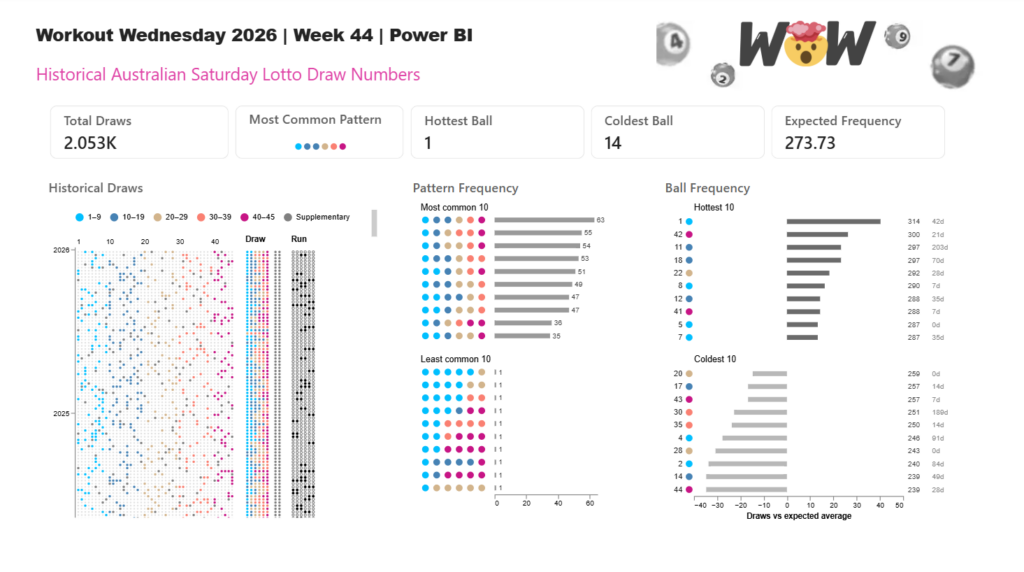
Visualising the draws:
- Calculate the total number of lotto balls
- Group the balls into groups of 5 or 10
- Import Deneb custom visual and add the associated fields into the field well
- Create a chart that displays the total number of lotto balls by total games (e.g. for a lotto that has 30 numbered balls, display 30 grey circles along the x-axis by number of games along the y-axis)
- Colour each lotto ball drawn in each game by the groups created in 2.
- Concatenate another chart to the right displaying just the drawn balls in order of group (Supplementary or power balls are optional)
- Concatenate another chart to the right that highlights balls that are sequential in number (e.g. 6 balls drawn as white circles with black outline, filled black only when sequential numbers are drawn. e.g. 1,6,7,20,32,38 would appear as ○●●○○○)
Optional Extra:
- Create a chart showing the most frequent draw patterns (e.g. ball groups)
- Create a chart showing the most frequently drawn numbers
Get Creative:
Create your own visuals and redesign this report page to tell a better data story.
Share
After you finish your workout, share on social media using the hashtags #WOW2026 and #PowerBI.
On Bluesky, tag @mmarie.bsky.social, @shan-gsd.bsky.social, and @merrykerry.bsky.social.